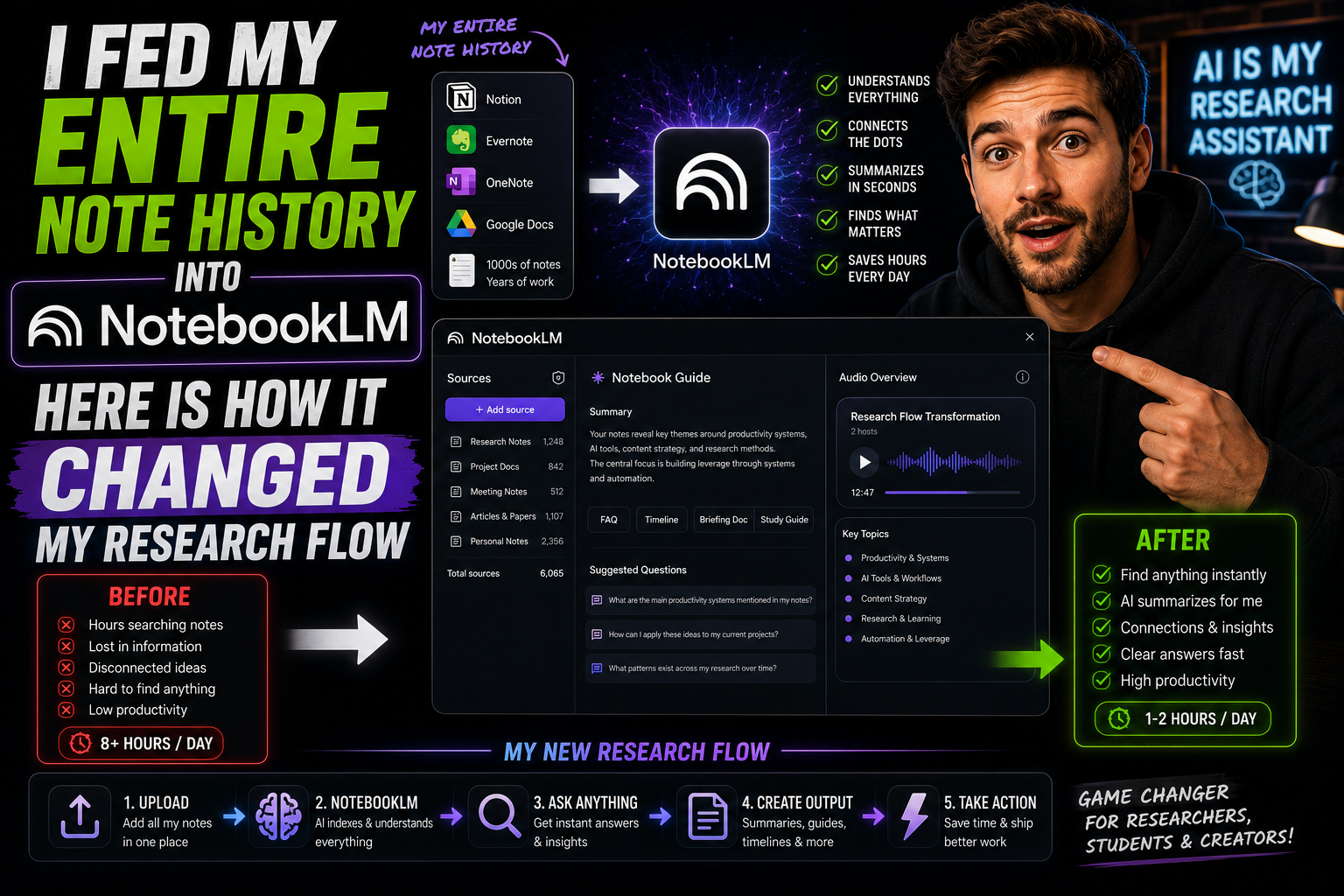
Introduction: The Digital Hoarder’s Dilemma
For over a decade, I operated under a comforting illusion: I was building a “Second Brain.”
Every time I read a breakthrough industry report, bookmarked a high-value whitepaper, saved a code snippet, or jotted down a quick strategy in Notion, Apple Notes, or local Markdown files, I congratulated myself. I was building a personal library of insights that would supercharge my career.
Except it didn’t. In reality, I had built a digital graveyard.
Whenever I started a new project or researched a complex topic, finding what I had saved months or years prior felt like digging through an unorganized attic. Traditional keyword searches (Ctrl+F) were useless. Searching for terms like “conversion rates” or “API architecture” yielded hundreds of isolated text hits with zero context. I spent more time searching for my notes than actually synthesizing them.
Then I decided to run an extreme experiment: I uploaded my entire digital note history into Google’s NotebookLM.
I wanted to see if modern AI could transform my chaotic digital scrapheap into an active, intelligent partner. The results didn’t just clean up my workflow—they fundamentally changed how I acquire, organize, and execute knowledge. Here is what happened, how I set it up, and how you can do the exact same thing.
What Makes NotebookLM Different From Standard Chatbots?
Before diving into my setup, it is crucial to understand why standard LLMs like ChatGPT or Claude failed at this task, whereas NotebookLM excelled.
When you paste raw notes into a standard chatbot, it processes them within a transient chat window. It frequently hallucinates, mixes up facts from its pre-training data, and gives generic advice.
NotebookLM operates on an entirely different architecture: Source Grounding.
[ Your Uploaded Notes & Documents ] ──> [ Source-Grounded LLM ] ──> [ 100% Verifiable Answers + Citations ]
When you query NotebookLM, it acts as a strict “walled garden.” It is forced to base its answers exclusively on the documents, PDFs, slides, web links, audio transcripts, and spreadsheets you feed into its workspace. If an answer isn’t in your notes, it doesn’t invent one—it simply tells you.
With a massive context window capable of processing up to 1 million tokens per notebook, I realized I could feed hundreds of pages of personal dense notes into a single workspace without hitting a wall.
Step 1: Ingesting the Digital Chaos
To turn a chaotic digital note collection into a structured intelligence network, you cannot just throw everything into a single massive bucket. I established a clean visual domain strategy by grouping my note history into dedicated, topic-specific Notebooks:
My Core Notebook Architecture
-
📁 Market Strategy & Monetization: 5 years of ad network analyses, affiliate frameworks, landing page breakdowns, and conversion optimization notes.
-
📁 Technical Architecture & AI Pipelines: API documentations, model benchmark notes, Python scripts, and hardware specs.
-
📁 Creative Drafts & Content Vault: Raw essay outlines, published articles, newsletter archives, and editorial feedback.
-
📁 Personal Finance & Portfolio Strategy: Swing trading logs, market summaries, macro analyses, and crypto research.
Importing Multi-Format Data
One of the most impressive aspects of the setup was how effortlessly NotebookLM ingested disparate file types. I didn’t have to clean or reformat my history into standardized text files. I uploaded:
-
Google Docs & PDFs: Research papers and strategy briefs.
-
Microsoft Word & Excel Files: Financial logs and campaign metrics.
-
Web Links & YouTube URLs: Industry breakdown videos (where NotebookLM automatically indexed the full video transcript).
-
Raw Audio Recordings: Voice memos recorded during brainstorms.
In less than ten minutes, over eight years of scattered research were parsed, indexed, and ready for query.
Step 2: From Passive Archiving to Conversational Synthesis
The moment my notes were ingested, my research workflow shifted from passive searching to active interrogation.
Instead of trying to remember which document contained a specific strategy, I began asking high-level synthesis questions directly in the chat panel:
My Query: “Cross-reference my 2024 campaign notes with my 2025 analytics reports. What were the top three conversion bottlenecks I identified back then, and what solutions did I pitch that I haven’t implemented yet?”
In less than 10 seconds, NotebookLM generated a comprehensive, bulleted executive summary. It didn’t just summarize; it synthesized cross-document patterns that I had completely forgotten existed.
┌─────────────────────────────────────────────────────────────────────────────┐
│                          NOTEBOOKLM SYNTHESIS OUTPUT                         │
├─────────────────────────────────────────────────────────────────────────────┤
│ 1. Friction in Mobile Funnels                 │
│    - Identified a 14% drop-off on mobile checkout forms.                   │
│    - Unimplemented Fix: One-click guest checkout integration.               │
│                                                                             │
│ 2. Unoptimized Retargeting Frequency   │
│    - Over-saturating custom audiences within the first 48 hours.             │
│    - Unimplemented Fix: Capping frequency at 3 impressions/day.             │
└─────────────────────────────────────────────────────────────────────────────┘
The Power of Zero-Hallucination Citations
Every claim in NotebookLM’s output is paired with a clickable, numbered citation tag.
Clicking a citation doesn’t just point to a file name—it opens a split-screen panel showing the exact paragraph and sentence from my original uploaded document where that insight lives. This single feature completely eliminated fact-checking friction and restored total confidence in my archived research.
Step 3: Supercharging Deep Research with Agentic Capabilities
As my research expanded, I began leveraging NotebookLM’s advanced agentic capabilities to bridge the gaps between my personal notes and real-time external data.
1. Start-from-Scratch Web Sourcing & Deep Research
When my internal notes hit a dead end on a new topic, I didn’t need to leave the interface to open dozens of browser tabs. Using the Deep Research agent, I prompted the system to scan external web sources autonomously.
It generated a structured research plan, scoured high-authority technical papers and articles online, summarized the findings, and automatically ingested the newly discovered sources straight into my existing notebook panel.
2. Sandboxed Data Execution
For numerical research—such as analyzing historical ad spend spreadsheets or tracking trading logs—NotebookLM utilizes a secure cloud computing environment to run code in the background.
Instead of guessing math, it writes and executes Python code directly on my uploaded .csv and .xlsx files, returning precise calculations, statistical trend lines, and data summaries with zero arithmetic errors.
Step 4: Transforming Static Text into Interactive Knowledge Artifacts
One of the biggest breakthroughs in my new research flow was moving beyond standard text outputs. NotebookLM’s Studio Panel allows you to transform static notes into entirely new media formats:
The “Podcast On-the-Go” (Audio Overviews)
By selecting the Audio Overview feature, NotebookLM generates a stunningly realistic, two-host AI podcast conversation based exclusively on your uploaded sources.
-
I uploaded a dense, 60-page technical whitepaper on machine learning model compression.
-
Within minutes, the system generated a 12-minute audio episode where two AI hosts casually debated the key concepts, used helpful analogies, and highlighted practical takeaways.
-
I now listen to these custom “podcasts” during my morning workouts or daily commutes to absorb complex technical material effortlessly.
Studio Panel Artifact Exports
Beyond audio, the system allows one-click exports of curated research artifacts directly into working files:
-
Interactive Mind Maps & Study Guides: Auto-generating structural outlines and flashcard decks for quick review.
-
PowerPoint Decks (.pptx) & Word Docs (.docx): Turning raw notes into fully styled, editable client presentations and reports.
-
Data Visualizations (.png / .svg): Generating visual charts straight from my research metrics.
The Paradigm Shift: Before vs. After NotebookLM
To illustrate how dramatically this tool altered my daily productivity, consider the visual comparison below:
Practical Tips for Building Your Own AI Knowledge Engine
If you want to replicate this setup and turn your scattered notes into an active intelligence platform, keep these best practices in mind:
-
Maintain Subject-Specific Notebooks: Do not dump recipes, code snippets, and client notes into a single notebook. Keep them organized by distinct projects or knowledge domains.
-
Clean Up Metadata in Your Files: While NotebookLM handles unstructured text brilliantly, giving your notes clear headers and descriptive filenames makes citations much easier to navigate visually.
-
Prompt with Specific Constraints: Give the AI clear instructions on how to frame outputs (e.g., “Summarize key metrics into a markdown table with columns for Date, Platform, and ROI”).
-
Use Audio Overviews for Initial Orientation: When tackling a massive new folder of unfamiliar research, generate an Audio Overview first to get a high-level mental map of the material before diving into deep textual queries.
-
Trust, but Verify via Citations: Always click through the provided footnote citations on critical data points to verify the original context of your uploaded files.
Conclusion: The Death of the Passive Note-Archive
Feeding my entire note history into NotebookLM proved one fundamental truth: information is only as valuable as your ability to retrieve and synthesize it.
For years, we have been told to hoard information, bookmark articles, and build elaborate tag-based note systems that ultimately collect digital dust. NotebookLM officially ends that era. It transforms your notes from a passive archive into an active, conversational, and agentic thought partner.
If you have years of notes sitting dormant in cloud folders or local drives, stop letting that hard-earned knowledge go to waste. Feed them into a grounded AI workspace, ask hard questions, and watch your research velocity double overnight.